One mat. A whole arena.
No Bluetooth pairing. No Wi‑Fi. Step on a square and it gives off a high-pitched sound most people can't hear. Your phone picks it up and knows where you stepped.
Eight squares. Eight sounds.
The four corners and four sides make up 8 squares. Step on one and it gives off its own high-frequency sound, one most people can't hear. The center tile has no sensor. When the whole mat is put together, it's the rest square, and standing on it doesn't trigger anything. Your phone's microphone picks up the sound and can tell which square it came from.
- No pairingNo Bluetooth, no Wi‑Fi. Open the app and start stepping.
- Snaps togetherInterlocking tiles snap together to play and come apart for easy storage and moving. MotionParty and MotionSports even split the tiles up among the players.
- Replaceable batteriesEach sensor runs on one CR2032 coin cell battery you can replace yourself.
How each game uses the mat
It's the same mat, but each game uses it a little differently. Each game's page shows the full setup, and the app walks you through it step by step.



What's in the box
One bundle is all it takes to play all four games. The box includes a serial card. Redeem it once in any of the apps to unlock all four games.
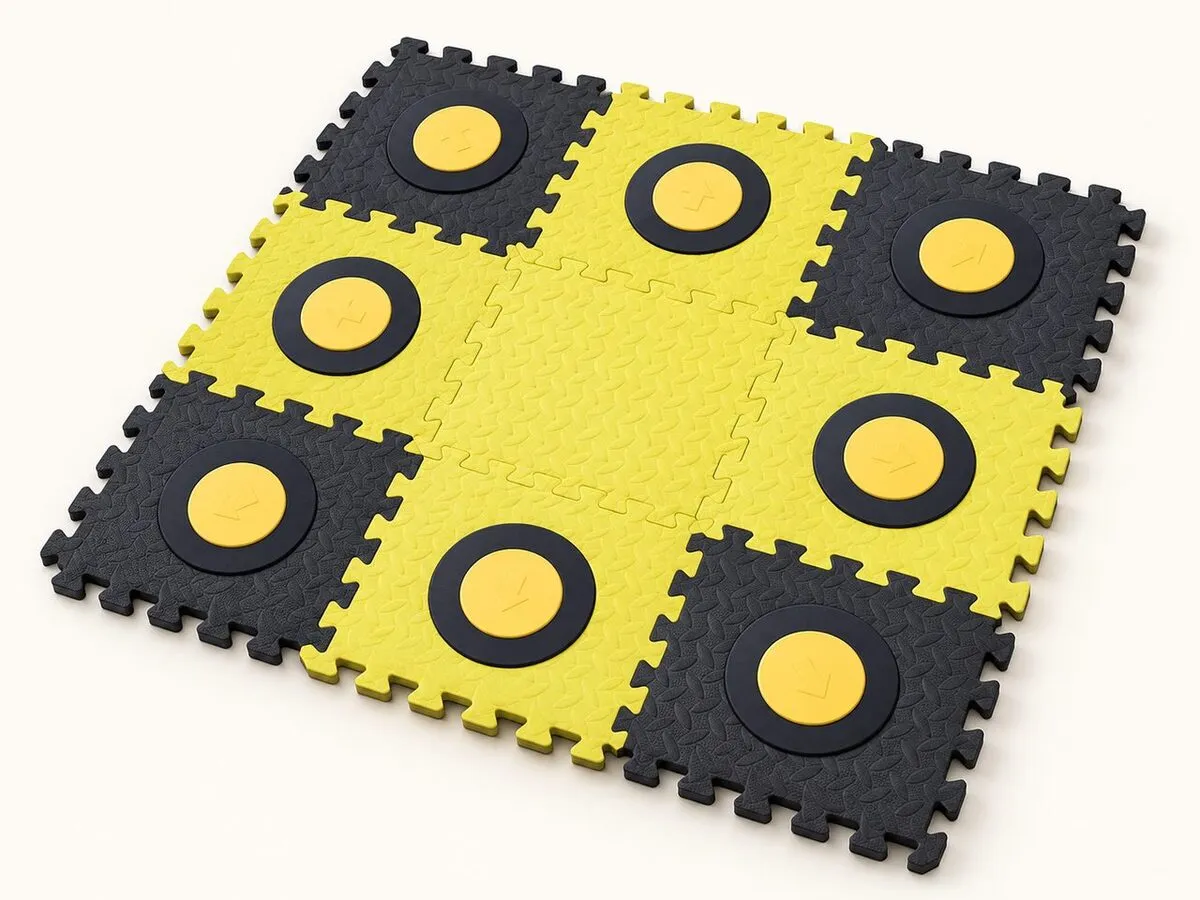
Product illustration. The actual product may look different.
MotionPad Bundle
- MotionPad AI Game Mat (3×3, 8 sensors + center rest square) ×1
- Blank tiles ×3: extras, the same as the center tile (12 tiles in total with the 3×3 grid)
- Serial card ×1: scratch off the coating to reveal a 16-character serial code and QR code
- CR2032 coin cell batteries ×8: preinstalled in the sensors; remove the battery pull tabs before first use
- Instructions for Use
One-time purchase license: redeem to unlock all four games at once
Price TBA
Also available
- Extra AccountIn-app purchase for a family member's own account, or anyone with a mat but no licensePrice TBA
- Spare tilesSingle tiles, 2-tile sets, and 4-tile sets; game license not included. See the Instructions for Use for the full list.Price TBA
Specs
| Layout | 3×3 grid; 8 sensor squares across the corners and sides, with a rest square in the center |
|---|---|
| Product name | MotionPad AI Game Mat |
| Model | EZO-M002 |
| Sensing | Each square gives off a high-frequency sound at its own frequency (18–24 kHz), picked up by your phone's microphone |
| Connectivity | No Bluetooth pairing or Wi‑Fi needed |
| Dimensions | 87 × 87 cm (joints overlap); single tile 32 × 32 cm |
| Weight | 3 kg (assembled 3×3 grid) |
| Material | Tiles: EVA + non-slip mesh fabric; sensor housing: ABS |
| Batteries | CR2032 3V coin cell, 1 per sensor, 8 in total; user-replaceable |
| Supported phones | Android 7.1 or later (MotionSports requires Android 10 or later) and iOS 15 or later; compatible models being verified |
| Operating environment | 10–40 °C |
| Warranty | 6 months (excluding user-caused damage) |
See the Instructions for Use for full specs, assembly, and how to replace the batteries.
Supported phones
At launch, MotionPad supports Android phones and iPhone. The mat's sounds are picked up by your phone's built-in microphone. We're still testing how well each model picks them up, and we'll post the compatibility list here once it's confirmed.
- Android 7.1 or later (MotionSports requires Android 10 or later): download the apps from Google Play (coming soon)
- iPhone (iOS 15 or later): download the apps from the App Store (coming soon)
- Make sure your case or stand doesn't cover the microphone
Setup and use
Placement
Lay the mat on a flat floor with all edges pressed flat, not curling up. Leave a step's worth of space around it, away from walls and furniture.
Distance
Follow each game's instructions. For MotionPad Arcade and MotionPuck, place your device 1–3 m (3–10 ft) directly in front of the mat. For MotionSports, lay your phone flat on the floor next to the mat. For MotionParty, we recommend a tablet placed near the tiles. Keep the microphone clear of cases, stands, and hands.
Footwear and flooring
We recommend non-slip socks or soft-soled indoor shoes. Hard floors work best; thick carpet can make the mat feel unsteady underfoot.
Cleaning and care
Wipe the surface with a slightly damp cloth. Don't rinse or soak it. Store it flat, and don't keep it rolled up or under heavy objects for long periods.
Safety information
- Battery covers should be opened by an adult using a tool. Keep coin cell batteries out of children's reach. If a battery is swallowed, seek medical attention immediately.
- After a drop, heavy pressure, or exposure to water, check the surface and sensors for anything loose. If something seems wrong, stop using the mat and contact support.
- Before stepping on, make sure there are no table corners, door thresholds, or cords nearby. We recommend that older adults have someone with them while playing.
- Don't take apart any part other than the sensors and battery covers. Doing so may keep the mat from sensing properly.
- Take breaks during long sessions and stay hydrated. Stop right away if you feel unwell.
- If you feel unwell, were recently injured, or have been advised by a doctor to limit physical activity, consult your doctor before use.
- This product is interactive play equipment for the home. It does not provide medical assessments and is not a substitute for a doctor or professional guidance.