Product overview
MotionPad is an interactive game mat that comes apart and snaps back together. It's made of nine interlocking foam tiles: the eight outer tiles each have a sensor, and the center tile is a blank tile with no sensor. When you step on a sensor, it gives off a short high-frequency sound. Your phone or tablet's microphone picks it up, and the app turns it into a game move right on the device.
Snap all nine tiles into a 3×3 grid to play solo, or split them up for 2–4 players, depending on the game. The bundle comes with a serial code. Redeem it in the app to unlock all four games at once (see Get started & redeem).
- Eight directions: up, down, left, right, and the four diagonals, one direction per tile.
- Arrow markings: The arrow on each sensor shows its position in the 3×3 grid, so you can follow the arrows to put the tiles back together after taking them apart.
- Interlocking design: Quick to assemble, take apart, and store.
- Modular: The sensors are fixed to the tiles, making assembly and replacement easy.
- Works with the app: Game prompts, levels, and records all live in the app.
- Replaceable batteries: Each sensor uses one CR2032 3V coin cell battery.
Safety reminder: Use the mat on a flat, dry floor with no obstacles. Before use, make sure all nine tiles are snapped together with no edges lifting, and keep the area around the mat clear.
Assembly and disassembly
- Sound holes: Each sensor has five small holes where the sound comes out. When assembling, turn every tile so its sound holes face up (toward the top edge of the grid, as shown). This is the common reference point for all tiles.
- Arrow: With the sound holes facing up, the arrow points to the tile's position in the grid. For example, an arrow pointing to the upper left means position 1. When you split the mat for multiplayer, use the arrows to tell the tiles apart, too.
Assembly
- The sensors come already fixed to the tiles, so there's nothing to install.
- Make sure each tile's sound holes face up.
- Following the arrows, place each tile in its matching position in the grid. Put the blank tile in the center.
- Press the 3 × 3 tiles together one by one along their interlocking teeth, then check around the edges that every seam is flat and secure.
Not sure of a position? Check the layout diagram above or the marking on the back of the sensor. If a sensor has been removed from its tile, put it back with its sound holes lined up with the holes on the tile's sound-hole label.
Taking apart and storing
- First close the app or end the game in progress.
- Starting from an outer corner, place both hands near a seam and pull the tiles up and apart.
- Separate the tiles one by one and store them flat or upright. Don't keep them bent for long periods.
Don't step on or twist the joints to pull them apart. If a seam is stuck, apply force with your hands close to the seam.
First use
Remove the battery pull tabs first
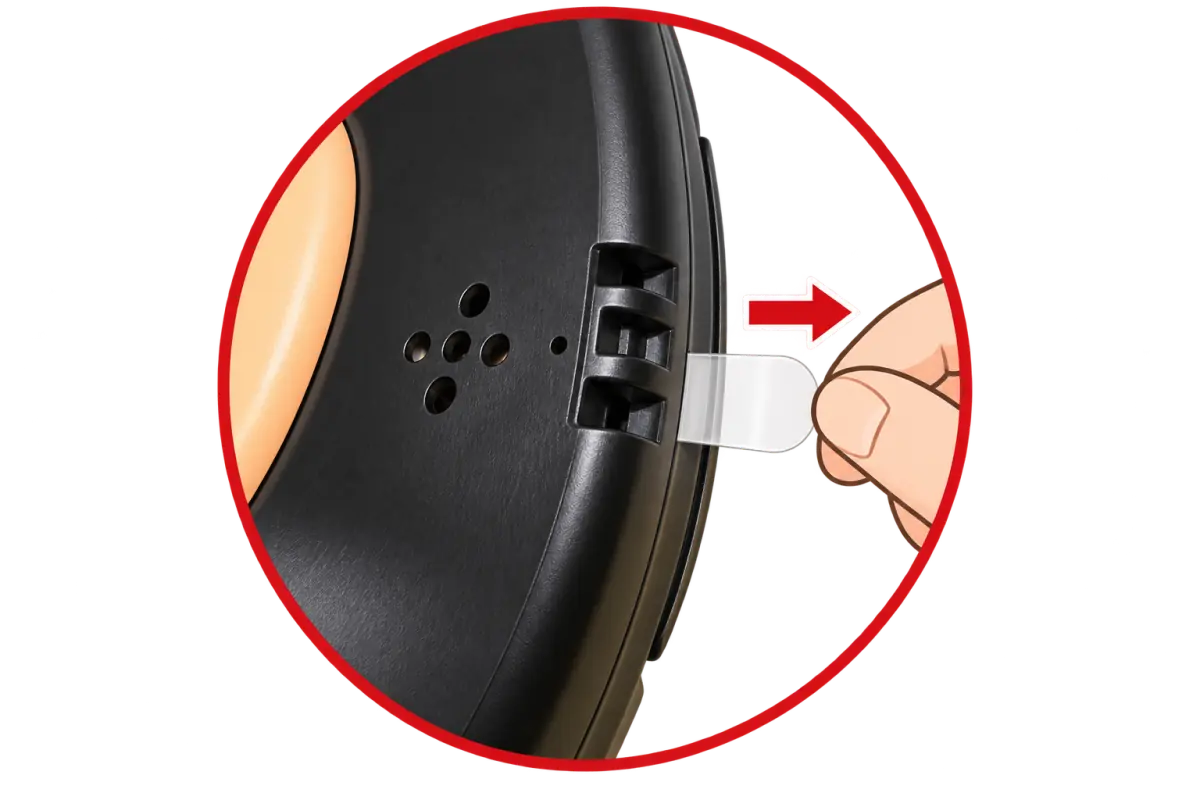
The batteries come already installed. A clear insulating pull tab is clipped into the battery cover slot on the side of each sensor, with a rounded end you can pinch. Pull the tab out before use; the sensor won't power on until the tab is removed. Do this for all 8 sensor tiles.
Connect to the app
- Snap the mat into a 3×3 grid (see Assembly and disassembly), or split it up as the game instructs.
- Download any MotionPad app from the App Store or Google Play (coming soon). For supported systems, see Specs.
- Allow microphone access when the app asks. The app uses the microphone to pick up sounds from the mat. The sound is interpreted in real time on your phone only. It's never recorded, saved, or uploaded.
- The first time you open an app, you can skip sign-in and play some of the basic content in each game on the mat. To unlock all four games, sign in with a Google or Apple account and scan the QR code on your serial card or enter the 16-character serial code. See Get started & redeem for the steps.
- Following the app's instructions, step once on each of the 8 sensor tiles to make sure every square responds.
Batteries and replacement
- Power indicator: When you step on a sensor, a green light comes on to show the battery is working. If it doesn't light up, the battery may be dead and should be replaced.
- Batteries: One CR2032 3V lithium coin cell battery per sensor, 8 in total.
- Battery life: At least 360 hours of continuous stepping. Actual battery life varies with how often and where you use the mat.
How to replace a battery
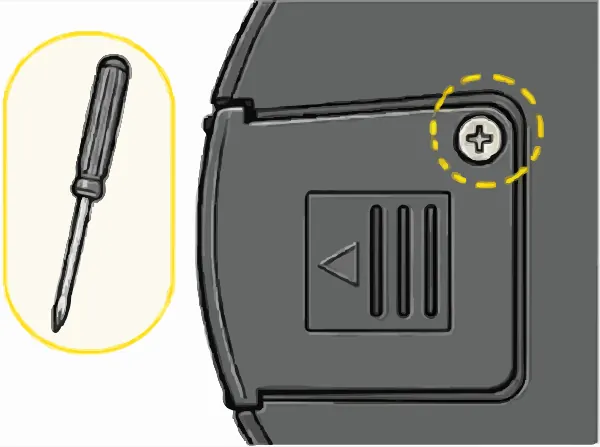
Get a screwdriverHave a Phillips screwdriver ready. 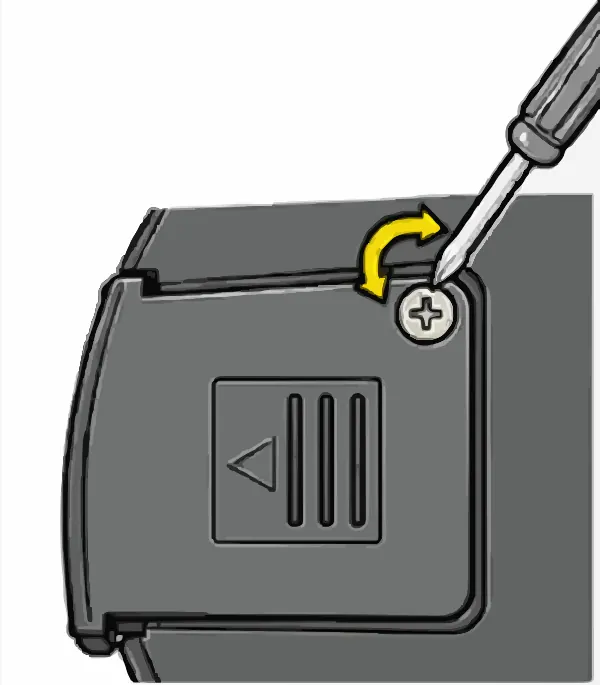
Remove the screwUnscrew and remove the screw holding the battery cover. 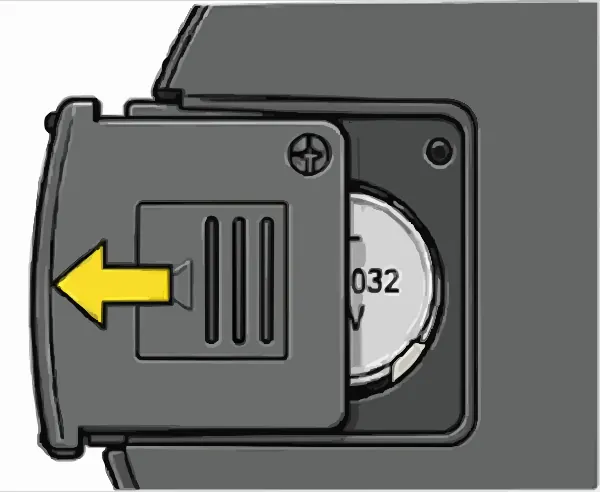
Slide the cover openPush it to the left, in the direction of the arrow on the cover. 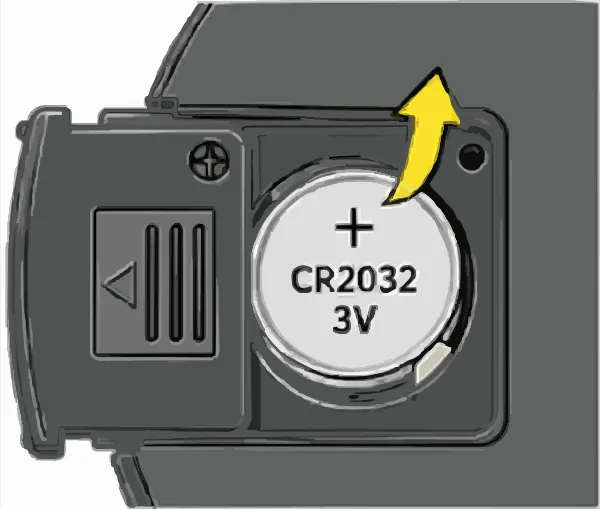
Remove the old batteryTake the old battery out of the battery compartment. 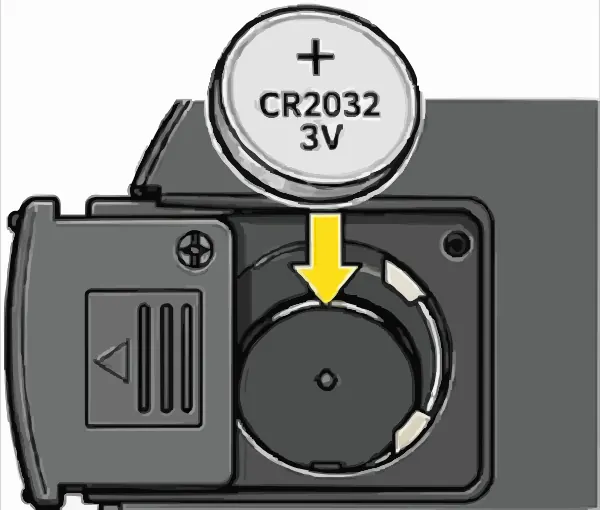
Insert the new batteryInsert a new CR2032 with the + side facing up. 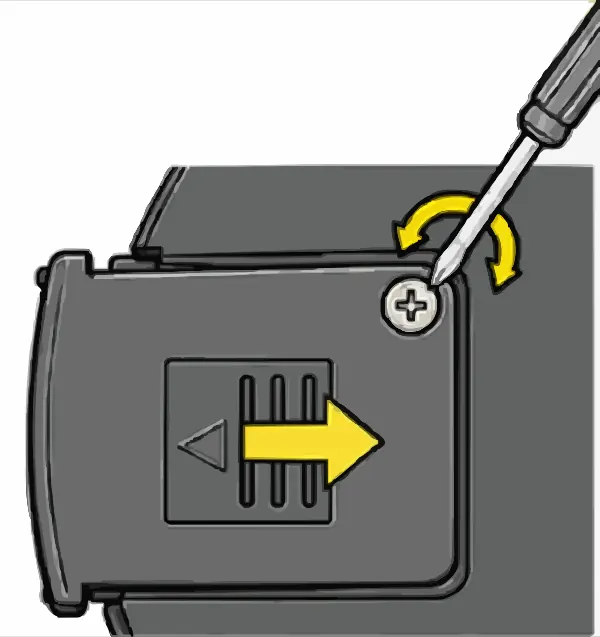
Close and secureSlide the battery cover back to the right and tighten the screw.
Battery compartment safety features
- Screw-secured: Opening it requires a tool, which helps keep children from opening it.
- Sliding cover: The battery cover slides open only after the screw is removed.
- Recessed compartment: The battery sits inside the compartment and doesn't come loose easily.
Cautions
- Use only CR2032 3V lithium coin cell batteries.
- Don't insert batteries with the + and − sides reversed.
- Don't mix old and new batteries, or batteries of different types.
- Keep coin cell batteries out of children's reach. Swallowing one can cause serious injury. If a battery is swallowed, seek medical attention immediately.
- Battery covers should be opened by an adult using a tool. After replacing a battery, make sure the cover and screw are securely fastened.
- Recycle used batteries according to local regulations. Don't throw them in household trash or into a fire.
Splitting the mat for multiplayer
You can use the 3×3 mat as a whole or split it up, depending on the game. Here's how each of the four games uses it. Each game's page has the detailed steps, and the app walks you through them too.
- One set per player: Once the mat is split, each set is for one player. When several people play, each person uses their own set.
- Use the arrows to tell tiles apart: Each tile's number is shown by the arrow on its sensor (see Assembly and disassembly).
- Who's Player 1: Set this up by following the instructions in the app.
- Extra blank tiles: The bundle comes with 3 extra blank tiles (the same as the center tile), for 12 tiles in total including the 3×3 grid. When you split the mat, MotionParty can take a blank tile in the middle of each pair, and MotionSports takes one in the middle of each cross; you stand on the blank tile. See Setting up on the MotionParty and MotionSports pages.



Specs
| Product name | MotionPad AI Game Mat |
|---|---|
| Model | EZO-M002 |
| Product type | Interactive 3 × 3 exercise mat |
| Configuration | 9 tiles: 8 outer sensor tiles (8 directions) + 1 blank center tile; the bundle also includes 3 extra blank tiles (12 tiles in total) |
| Dimensions | 87 × 87 cm (joints overlap); single tile 32 × 32 cm |
| Weight | 3 kg (assembled 3×3 grid) |
| Material | Tiles: EVA + non-slip mesh fabric; sensor housing: ABS |
| Batteries | CR2032 3V lithium coin cell, 1 per sensor, 8 in total (preinstalled) |
| Sound signal | 18–24 kHz; each of the 8 sensors uses a different frequency; emitted continuously while pressed; one-way (mat → phone) |
| Sensing method | Stepping on a sensor presses a switch, and its buzzer gives off a sound at that sensor's frequency; a phone or tablet microphone picks it up, and the app interprets it as an input on the device |
| Connectivity | No Bluetooth pairing or Wi‑Fi needed |
| Supported app platforms | Android 7.1 or later (MotionSports requires Android 10 or later); iOS 15 or later |
| Operating environment | 10–40 °C |
| Storage environment | −10 to 50 °C |
| Humidity | 20–90% RH (non-condensing) |
| Warranty | 6 months (excluding user-caused damage). See the Terms of Service for details. |
Items and SKUs
When ordering or asking about spare tiles, please include the SKU. Positions correspond to numbers 1–9 in the layout diagram under Assembly and disassembly.
EZO-M002-S01 (9-tile set) is the MotionPad Bundle and includes a game serial code. 4-tile sets, 2-tile sets, and single tiles are spare or replacement tiles and don't include a game license. Prices and release dates will be announced separately.
| SKU | Item | Positions |
|---|---|---|
| EZO-M002-S01 | 9-tile set (MotionPad Bundle: 9 tiles + 3 blank tiles) | 1–9 |
| EZO-M002-S02 | 4-tile set A (corners) | 1, 3, 7, 9 |
| EZO-M002-S03 | 4-tile set B (sides) | 2, 4, 6, 8 |
| EZO-M002-S04 | 2-tile set A | 1, 2 |
| EZO-M002-S05 | 2-tile set B | 3, 6 |
| EZO-M002-S06 | 2-tile set C | 4, 7 |
| EZO-M002-S07 | 2-tile set D | 8, 9 |
| EZO-M002-S08 | Single tile 1 | 1 |
| EZO-M002-S09 | Single tile 2 | 2 |
| EZO-M002-S10 | Single tile 3 | 3 |
| EZO-M002-S11 | Single tile 4 | 4 |
| EZO-M002-S12 | Single tile 5 (center blank tile) | 5 |
| EZO-M002-S13 | Single tile 6 | 6 |
| EZO-M002-S14 | Single tile 7 | 7 |
| EZO-M002-S15 | Single tile 8 | 8 |
| EZO-M002-S16 | Single tile 9 | 9 |
- 9-tile set: The 9 tiles of the 3×3 grid plus 3 extra blank tiles, 12 tiles in total. This is the MotionPad Bundle.
- 4-tile sets: One cross for one MotionSports player. Set A is the four yellow corner tiles; set B is the four black side tiles. With sets A and B, 2 people can play together.
- 2-tile sets: One yellow tile and one black tile for one MotionParty player. With sets A–D, 4 people can play together.
- 4-tile sets and 2-tile sets each also come with 1 blank tile (position 5).
Environment and care
- Temperature and humidity: Use at 10–40 °C and store at −10 to 50 °C, with humidity of 20–90% RH. Don't let condensation form on the mat.
- Placement: Lay the mat on a flat, hard floor with all edges pressed flat, not curling up. Leave a step's worth of space around it. Thick carpet can make the mat feel unsteady underfoot.
- Phone placement: Follow the instructions in the app and on each game's page. Keep the microphone clear of cases, stands, and hands.
- Cleaning: Wipe the surface with a slightly damp cloth. Don't rinse or soak it.
- Storage: Store the tiles flat or upright. Don't keep them bent or under heavy objects for long periods.
For more safety precautions, see the safety information on the mat page.
Battery and product recycling
This product contains lithium coin cell batteries. Recycle used batteries and end-of-life products according to local regulations. Don't throw them in household trash or into a fire. In Taiwan, you can drop off used batteries at convenience stores, supermarkets, and hypermarkets with battery collection bins.
When removing a battery, don't let any metal object touch its + and − sides at the same time, as this can cause a short circuit.
Contact us
| Manufacturer | Genius Holdings Co., Ltd. (薩摩亞商傑尼斯投資控股有限公司台灣分公司) |
|---|---|
| Address | 10F, No. 66, Sec. 1, Chongyang Rd., Sanchong Dist., New Taipei City, Taiwan |
| Support email | service@genius-gh.com |
| Website | motionpad.genius-gh.com |
For questions about the product, returns and exchanges, or serial codes, email us from the address you use to sign in to the app, and include proof of purchase, such as a receipt or invoice, so we can verify your purchase. If we need your serial code, we'll ask for it. Send it only to our support email, and never share it publicly. For common questions, see FAQ & warranty.